
API Keys
The simplest way to use HITL from scripts, CLI tools, and automation workflows. No OAuth setup required.
🔑What are API Keys?
API Keys provide simple, secure access to HITL from scripts, CLI tools, and automation workflows. No OAuth setup required—just create a key and start using it.
Zero Configuration
Create key in app, set environment variable, done
CLI & Scripts
Perfect for hitl-cli, automation scripts, and CI/CD
Secure & Simple
Long-lived bearer tokens with easy revocation
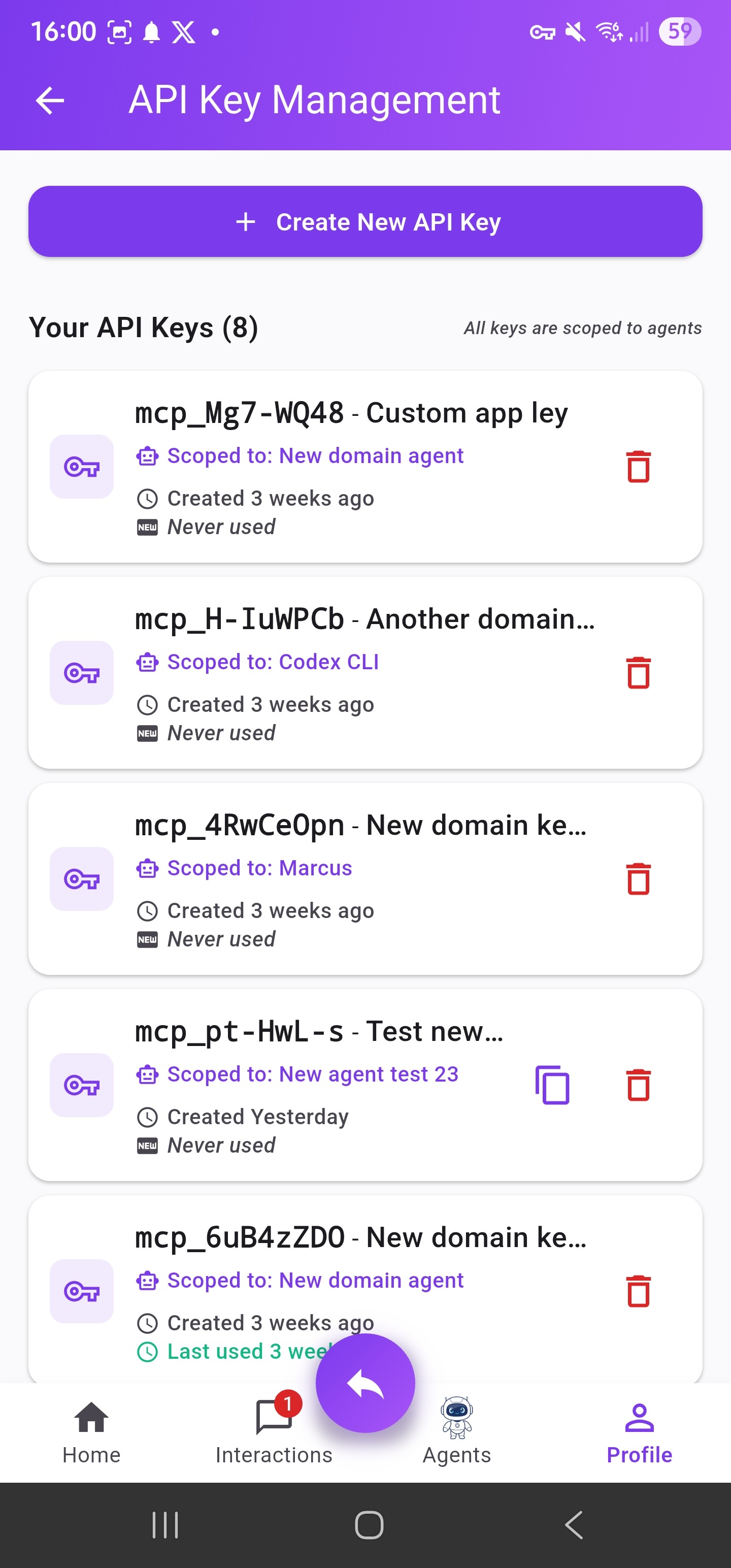
API key management interface
⚡Quick Start
Get started with API keys in 3 simple steps:
Create an API Key in the Mobile App
Navigate to Agents → API Keys → Create New API Key
Give it a name like "My CLI Key" and copy the key immediately
Set the Environment Variable
export HITL_SERVER_URL="https://hitlrelay.app"
Use the CLI or SDK
That's it! No OAuth, no registration, no additional setup required.
💡Pro Tip: API Keys work everywhere—CLI tools, automation scripts, CI/CD pipelines, and custom integrations. Just set the environment variable and go.
🧭Finding API Keys in the App
Open Agents Tab
From bottom navigation bar
Tap API Keys
In settings menu or top of screen
➕Creating a New API Key
Tap Create Button
On the API Key Management screen, tap Create New API Key
Name Your Key
Enter a descriptive name (e.g., "GitHub Workflow Integration" or "Personal Automation Script")
Confirm Creation
Tap Create to generate the key
⚠️IMPORTANT: Your New API Key
After you create the key, you'll see the full API key displayed.
This is the only time the full key will ever be displayed. For security reasons, the app will not store or show the full key again.
You must copy this key and store it in a secure location immediately, such as a password manager.
If you lose the key, you will have to revoke it and create a new one.
🗑️Revoking an API Key
If a key is no longer needed or you suspect it has been compromised, revoke it immediately. This permanently disables the key.
Open Management Screen
Go to the API Key Management screen
Find the Key
Locate the key you wish to revoke in the list
Tap Revoke
Tap the Revoke button or icon for that key
Confirm
Confirm in the dialog that appears
✅The key will be removed from the list and will no longer be able to access the HITL service.
🎯Common Use Cases
🖥️CLI Tools (hitl-cli)
Perfect for command-line interactions with HITL.
export HITL_API_KEY="..."
hitl-cli request --prompt "Deploy?"🤖CI/CD Pipelines
Automate approvals in GitHub Actions, GitLab CI, or Jenkins.
env:
HITL_API_KEY: ${{ secrets.HITL_KEY }}📜Automation Scripts
Python, Node.js, or shell scripts that need human input.
🔗Custom Integrations
Build your own tools that interact with HITL programmatically.
🔐Security Best Practices
🔑Treat Like Passwords
API keys grant full access to your HITL account. Store them securely and never commit them to version control.
🔄Rotate Regularly
Periodically revoke old keys and create new ones to minimize compromise risk.
📝Descriptive Names
Use clear names (e.g., "GitHub Actions", "Local Dev") to easily identify and revoke keys when needed.
🔒Use Environment Variables
Store keys in environment variables or secret managers, never hardcode them in your code.